
Tag: intercom
-

Bolero Network Password and Admin PIN
Background Security improvements were implemented in Bolero firmware v3.5 and remain active in later firmware releases. Significant changes Admin Password In addition to the 4-digit Admin PIN, an alphanumeric password, at least eight characters long, is needed to access settings in the Bolero web interface. This password is defined by the user when a new…
-

Intercom Building Tool
Introduction An Excel based template spreadsheet has been designed to help collect information for the use in the design of the intercom system for your event. The information will assist prep staff preparing the system during prep. You can download a copy of the Excel spreadsheet using this link Intercom build tool 2026.xlsx Channels and…
-

Re-sizing ODIN following a port upgrade
ODIN will generate error messages if the licenced number of ports does not match the software configuration. To re-size the intercom, follow this procedure in AZ Edit. Enable re-sizing options Navigate to Options> Preferences and ensure the boxes are checked for: Click Apply, then ok and send the change to the intercom. Access the intercom…
-

Eliminating Background Noise on RTS Party Lines
Overview When party lines include audio sources other than RTS keypanels, background noisemay be present on the keypanels because the audio is continuously active.This background noise can be mitigated by enabling VOX (Voice‑Operated Exchange)on the associated ports and leveraging a keypanel auto‑talk function.This document outlines the recommended configuration steps within AZedit to reduce oreliminate background…
-

Unity Intercom Quick Guide
The following quick guide explains the features on the Unity Intercom app Interface Overview Operation
-
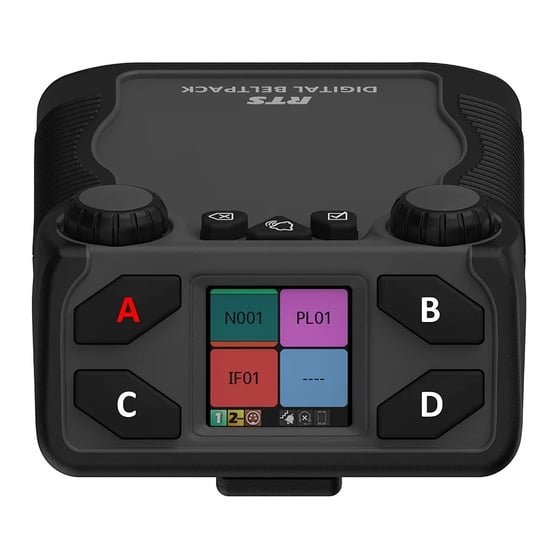
Assigning Keys on a RTS Digital Beltpack (DBP)
Digital beltpacks from RTS can be configured using the software packages IP Edit, AZ Edit and Neo. There are some functions that the user can configure from the device itself, providing the device has not been restricted in the software application. Changing the volume of a DBP channel The left encoder controls channels A and…
-
Changing the Operating mode of an RTS DBP
RTS Digital Beltpacks (DBP) with firmware version v 2.0.0 can now be toggled between OMNEO and RVON modes, without the need to re-flash firmware. RVON is RTS Intercom’s proprietary Voice Over Internet Protocol (VOIP), allowing devices to be deployed across a wide area network, including the internet. DBP controls The controls for the DBP are…
-

ODIN and OMS Intercom Functions
Introduction ODIN is a matrix intercom solution, with options to license up to 128 ports per unit. The intercom can be scaled up by connecting up to a maximum of eight ODINs. This achieves a maximum of 1024 ports. ODIN is suited to large, complex intercom configurations. OMNEO Main Station (OMS) is a digital partyline…
-

OMNEO Main Station – OMS
OMNEO Main Station (OMS) is a digital partyline Intercom solution, capable of the many applications required on events. OMS is similar to ODIN, which is a matrix intercom system, but has some features that are different and some limitations. What are the capabilities of OMS? OMS comes in various formats, which are determined by the…
-

Glensound Silver COIN-4016 Commentary panel
The Glensound Silver COIN 4016 commentator panel is a dual commentator and intercom panel for use with RTS intercom systems such as ODIN and OMS. The design is based on the RTS DKP-4016 16 key desktop panel, and it can be used standalone or integrated with a comms matrix. The panel uses OMNEO technology and…
-

Bolero Talkback Adaptors
We have purchased a stock of Bolero talkback adaptors from CTADAPT. The adaptors are XLR-4F to 2 x 3.5mm socket. The adaptors are intended for presenter talkback and are supplied with a microphone and a pair of stereo earphones, which can be swapped for personal in-ear devices.