
-

OpsHub User Guide
As CT UK shifts from Rental Point to EasyJob, the existing “ICal” / “ops pages” will be retired. While EasyJob offers many advantages, some gaps and wrap-around services are still needed for our daily operations. The new solution, “Ops Hub,” will provide these services.
-
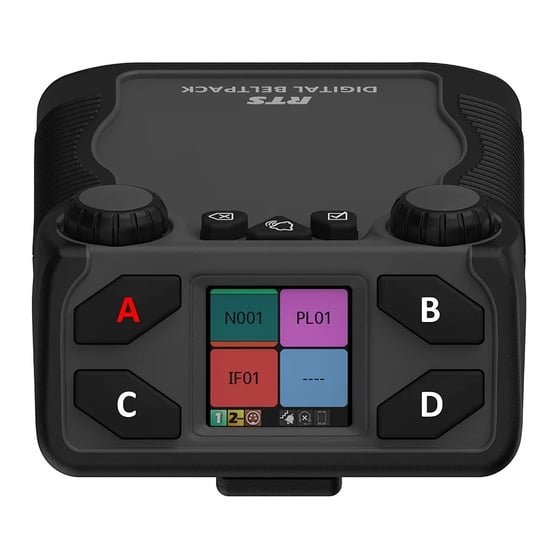
Assigning Keys on a RTS Digital Beltpack (DBP)
Digital beltpacks from RTS can be configured using the software packages IP Edit, AZ Edit and Neo. There are some functions that the user can configure from the device itself, providing the device has not been restricted in the software application. Changing the volume of a DBP channel The left encoder controls channels A and…
-
Changing the Operating mode of an RTS DBP
RTS Digital Beltpacks (DBP) with firmware version v 2.0.0 can now be toggled between OMNEO and RVON modes, without the need to re-flash firmware. RVON is RTS Intercom’s proprietary Voice Over Internet Protocol (VOIP), allowing devices to be deployed across a wide area network, including the internet. DBP controls The controls for the DBP are…
-
Changing the IP Address on a TN9300 Tait Node
Before you start you will need the following: A USB Keyboard. A Monitor with a VGA input A VGA Cable Connect the monitor to the VGA port on the server and the keyboard to the USB socket to the front of the machine. You’ll then be prompted to login. Enter the following and you should…
-
Programming Radios on RM
To access RM You need to be on the FOG Network. If RM has just been installed, you’ll need to add the server address “rm2.ct-networks.com” and port “443”. The main screen lists every DP radio enrolled on RM. If this is a fresh install it’s a good idea to re organise the columns and put…
-

Starlink Support and Location Updates Through Clarus
Clarus manage the CT Starlink subscriptions. Starlink no longer requires an update of location for the service to operate, as long as the Starlink remains in the country it’s registered to. CT’s Starlink is registered to the UK address if location needs to be updated to another country address, this can be done by contacting…
-
-
TouchController User Guide
Please find the the latest version of the TouchController User Guide below.
-

RTS Call Indicators
We have produced a signalling beacon to provide a visual alert of incoming calls on RTS ODIN and OMS intercom systems. These are useful in areas of high ambient noise, or when the Keypanel speaker cannot be used. The device consists of a power supply and relay, housed in a 3-D printed enclosure with top-mounted…
-

DANTE Technical Dives
DANTE Technical Dives Audinate recently ran a series of short webinars that may be of interest to those working in Audio and Comms. A recording of each Technical Dives will be available from the Audinate website soon. In the meantime, handouts from each of the webinars are included in the links below. DANTE Over Distance…
-
2110 Video Bandwidth Calculator
Feel free to use the below spreadsheet to calculate the estimated bandwidth for a 2110 video stream. You can change the resolution to a custom range, and select from a variety of frame rates / bit depths / sampling formats as per the industry standard & 2110-20 whitepaper.
-
Mainstage Training Suite Guide
Switching On Standing at the equipment rack in the corner of the room: Press the red power button on the mini PC to the right of the screens. Allow a couple of minutes PC to boot up Once booted, the smaller, wide touchscreen will display a Power On button and timer showing 0:00On the touchscreen,…